

Tokens & Wallet Provisioning
Apple Pay / Google Pay token states and provisioning issues.
A token is a virtual representation of a card number, created when the card is added to a digital wallet (Apple Pay, Google Pay) or saved on a merchant website. Each token typically corresponds to one device or service.
When a card is added to Apple Wallet (Apple Pay), the actual card number (PAN) is never stored on the phone or shared with the merchant during a transaction. Instead, Apple works with the payment network (Visa, Mastercard) to generate a unique token — a digital substitute for the card, tied specifically to that device.
Token States
| Status | Meaning |
|---|---|
| Active | Card successfully added and usable for payments. |
| Inactive | Card was added but not used, provisioning failed, or the card was removed from the wallet. |
| Deactivated | Card has been removed from the associated wallet or service. |
Customer Cannot Re-add Card to Wallet
An inactive or failed provisioning attempt can block future add-card attempts.
- Wirex can deactivate the affected tokens.
- Once deactivated, the customer should be able to re-add the card.
- Recommend the customer first unlinks the card from all wallets/websites where inactive tokens remain.
Provisioning Verification Paths
When a card is added to a wallet, the token request follows one of several paths:
| Path | What happens |
|---|---|
| Yellow | Token creation is pending activation until the cardholder confirms their identity with a one-time password (OTP) sent by SMS, email or phone call. The cardholder enters the code to activate the token. This is the standard verification method. |
| Orange | Same purpose as the Yellow path (identity verification before the token is approved), but specific to third-party wallets such as Apple Pay and Google Pay. Instead of entering an OTP, the cardholder makes a call as an additional verification step, and the token is approved manually once support has reviewed the details. |
| Red | The token request is rejected automatically, without any additional verification. Used when the issuer's fraud/risk rules flag the request outright. |
Why a Request Goes Through the Orange Path
The path is determined by risk and identity-verification signals evaluated at the time of the request. The Orange path is triggered specifically when the security level of the wallet account or the device qualification is considered insecure. In that case, the only way to activate the token is through direct contact between the cardholder and the issuer.
Orange Path User Flow
-
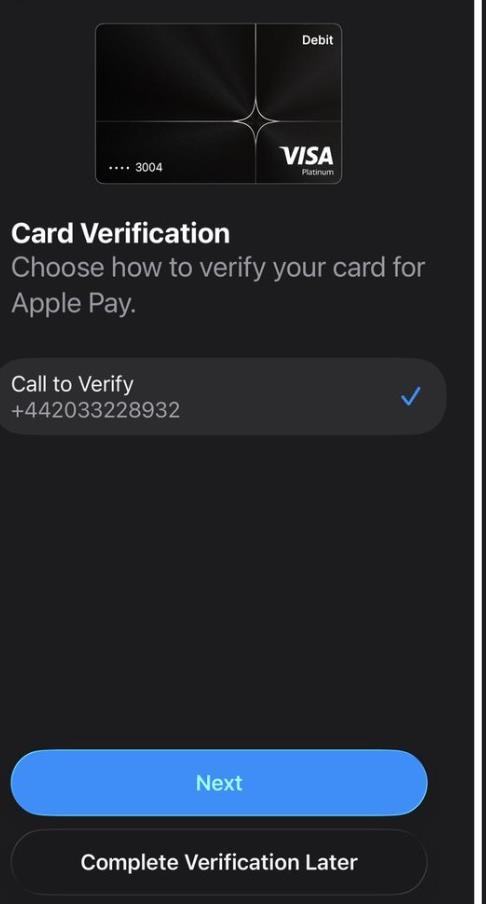
The user calls the number shown in the wallet. Apple Wallet shows a Card Verification screen with a single Call to Verify option and a phone number. The call is currently silent: the user hears nothing on the line. This is a known limitation of the current flow.
-
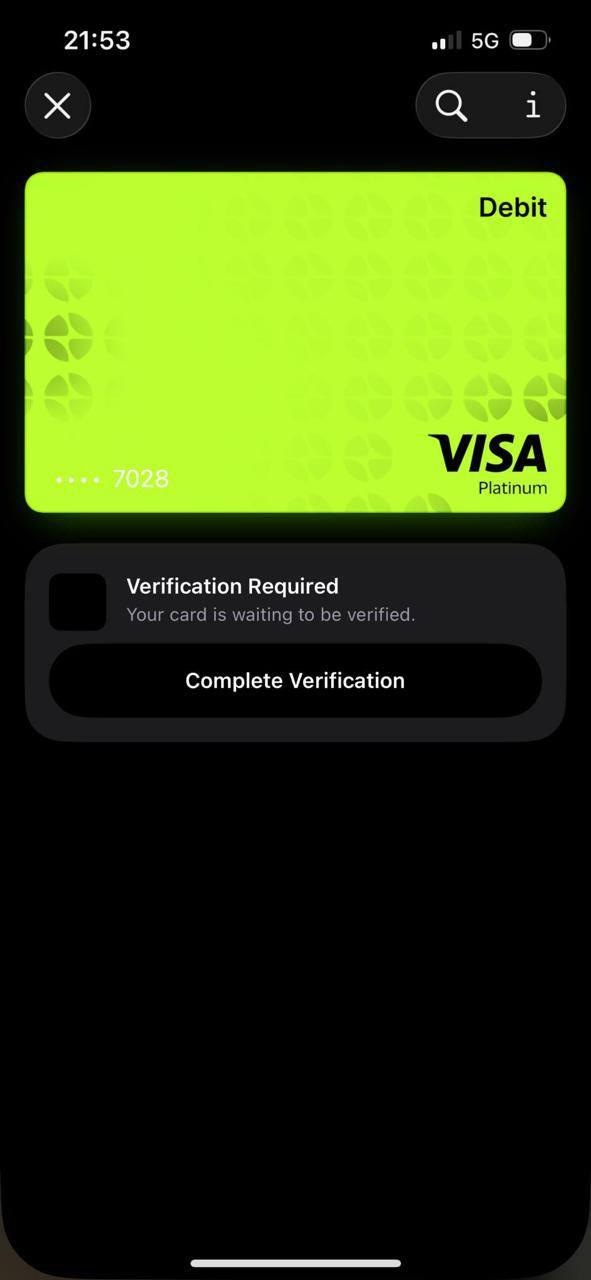
The call drops and the card stays unverified. The card appears in the wallet with Verification Required — Your card is waiting to be verified. The token is not active yet. The user contacts your support team, and you raise a ticket with Wirex so the request is verified and the token approved manually. See Support Portal Access for raising tickets.
-
Wirex support verifies the request. Wirex checks the request details and can send you further instructions to pass on to the user.
Updated 23 days ago