

Partner Fee Configuration
Set your own transaction fees and margins on top of the Wirex platform price from the admin panel.
Overview
You set your own fees from the Wirex admin panel, under Configuration → Fees.
Everything you configure is an addend: your margin, added on top of the platform price. You do not edit the platform's numbers, and nothing you enter reduces them.
charged fee = platform base × (1 − customer discount) + your addendThe two halves stay apart on purpose. The left half is Wirex revenue and Wirex discounts. The right half is yours, recorded separately on every calculation, so paying you out never requires reverse-engineering a total.
Two screens apply your margin, and a third assigns it per user:
| Screen | What it does |
|---|---|
| Company Fees | One set of numbers for every user of your company |
| Fee Scopes | Named fee sets you can assign to individual users |
| Subject Bindings | Assigns one user to one fee scope |
Which Fees Apply to a Transaction
Exactly one fee set prices a transaction. Wirex walks this order and stops at the first match. Two sets never merge.
| Priority | Source | Set on |
|---|---|---|
| 1 | A binding on that specific end user | Subject Bindings |
| 2 | The fee scope assigned to the company | Assigned by Wirex on your company record |
| 3 | The company's own fees | Company Fees |
| 4 | Platform default — no addend, you earn nothing | — |
Attribution: A fee scope carries your company id inside its name, so any fee priced through it is attributed to you. Company Fees carries no owner in its key — those addends are attributed to you only when your account is registered as a BaaS-class client. Confirm your client class with your Account Manager before relying on Company Fees for revenue.
Access
Your admin account is scoped to your own company. Platform-wide screens are hidden, and Wirex re-checks the scope on every request — the menu is convenience, not the boundary.
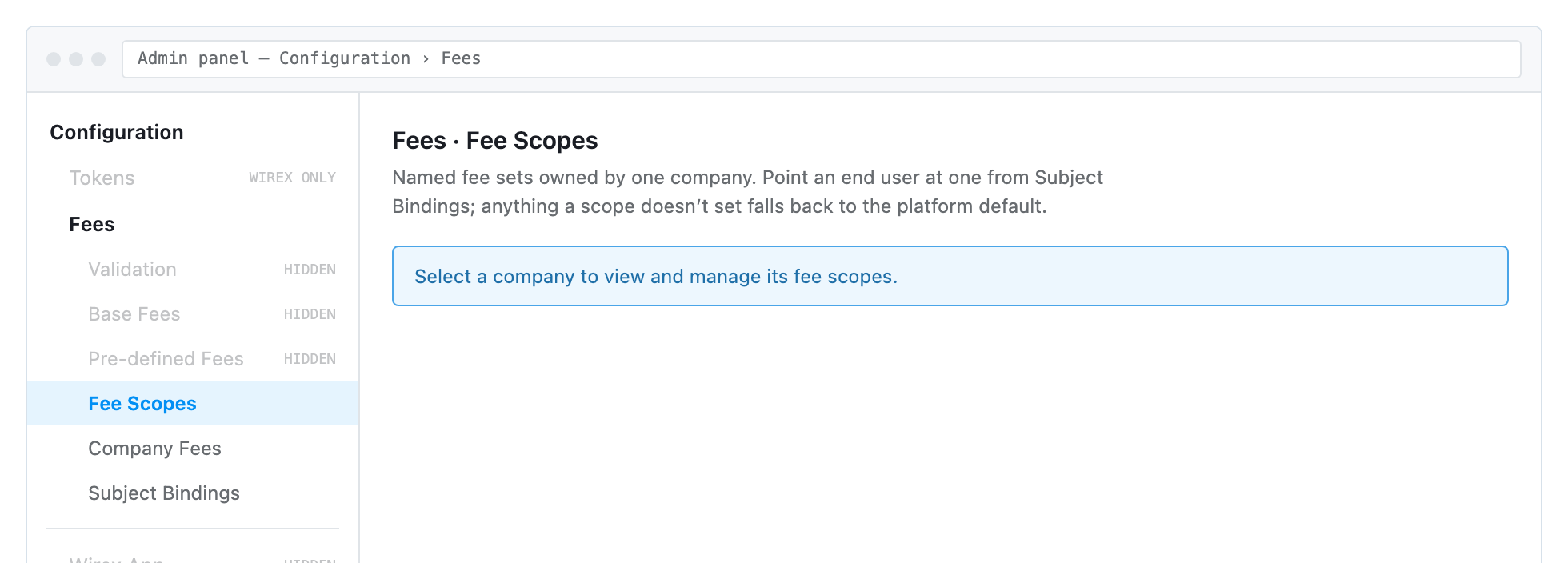
| Screen | Partner access |
|---|---|
| Fee Scopes | Your own scopes only |
| Company Fees | Your own company only |
| Subject Bindings | Your own company's users |
| Validation, Base Fees, Pre-defined Fees | Wirex only — not shown to partner accounts |
Two roles govern what you can do:
| Role | Permits |
|---|---|
| Editor | Open every screen above and read the values |
| Admin | Create a scope, save a table, bind a user, delete anything |
A page that loads but returns a permission error on Save means the account holds Editor and needs Admin.
Choosing Your Approach
| Company Fees | Fee Scopes + Subject Bindings | |
|---|---|---|
| Applies to | Every user of your company | Only users you bind to the scope |
| Setup | Enter the numbers and save | Create a scope, enter the numbers, bind each user |
| Varies by customer | No | Yes — one scope per price point |
| Attributed to you | Only on a BaaS-class account | Always |
| Use when | Your pricing is uniform | You run tiered or negotiated pricing |
Most partners use both: standard margin on Company Fees so every new customer is priced from day one, then a scope per exception, bound only to the customers who need it.
Important: A bound user takes the scope's numbers instead of the company numbers, not in addition to them. Transaction types the scope leaves blank fall through to the platform default. Build exception scopes as complete price lists.
Create a Fee Scope
A scope is an empty price list until you fill it in. Creating one changes no pricing.
Step 1: Open Fee Scopes
Go to Configuration → Fees → Fee Scopes. Your company is pre-selected. If you administer more than one, pick it from the Company field.
Step 2: Create the scope
Press New. Owner is fixed to your company and read-only — a scope is only ever created under the company you administer.
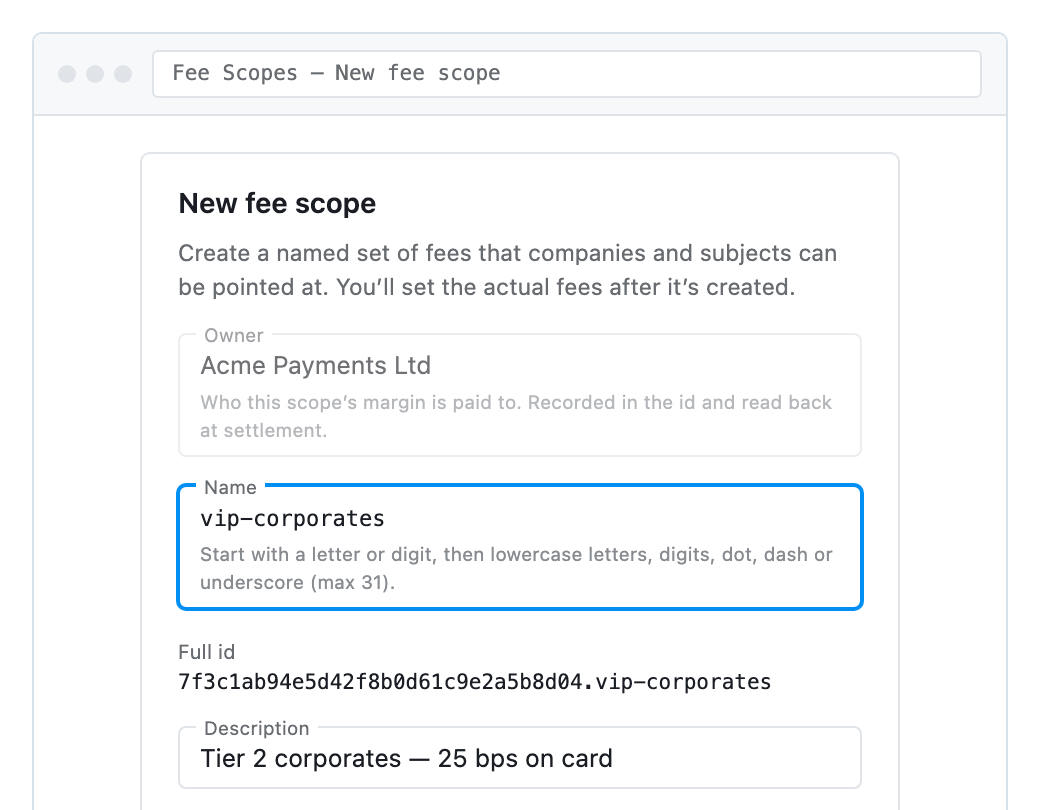
Name rules: lowercase letters, digits, dot, dash or underscore. Start with a letter or digit. 31 characters maximum. The dialog shows the Full id as you type.
The description is what appears in the scope picker afterwards. Tier 2 corporates, 25bps beats new.
Step 3: Record the full id
The full id is your company id (32 characters, no dashes), a dot, then your name:
7f3c1ab94e5d42f8b0d61c9e2a5b8d04.vip-corporatesThat prefix is how a fee is paid to you rather than absorbed by the platform, which is why the dialog builds it instead of accepting it typed. Step 3 of Bind an Individual User consumes this value — copy it from the line under the scope picker.
Deleting a scope
Delete is refused while a company is assigned to the scope, or a user is still bound to it. Unbind first.
This is deliberate. A scope that disappears while something still names it does not fall back to the default — it fails every transaction for that customer.
Enter Your Fees
The same editor serves Fee Scopes and Company Fees. Fees are grouped into tabs by what they are for, and each table inside a tab saves independently.
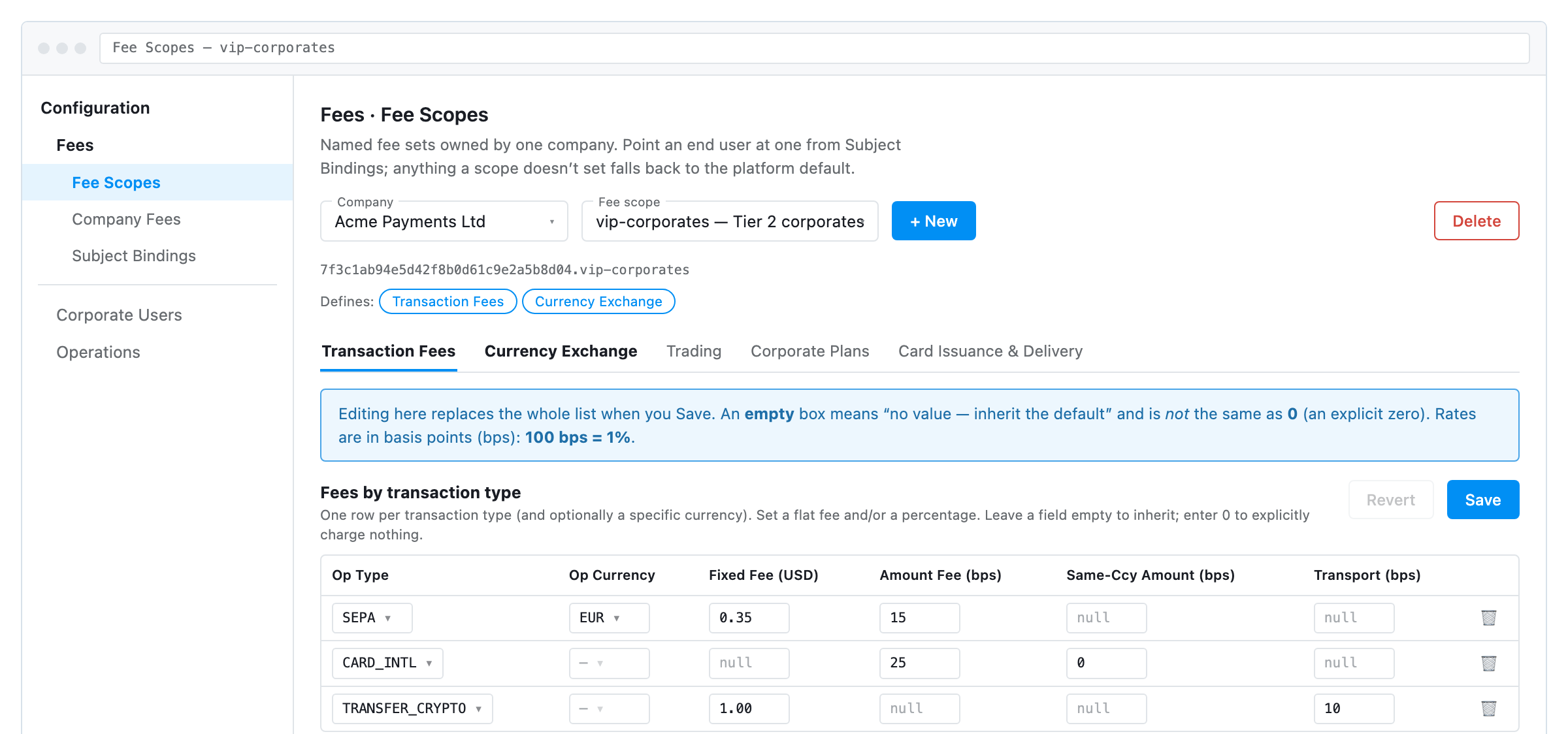
Bold tab labels mark the areas that already contain rows. Save stays greyed until you change something.
Four editing rules
| Rule | Effect |
|---|---|
| Save replaces the whole table | Save sends every row on screen and discards what was stored before. Delete a row and save, it is gone. Save an empty table and that table is cleared for the scope completely. |
| Empty is not zero | An empty box means "not setting this" — the platform value applies unchanged and you add nothing. A typed 0 means an explicit zero. The two produce different settlement outcomes. |
| Rates are basis points | 100 bps = 1%. 25 bps = 0.25%. 10000 bps = 100%. |
| One table at a time | Each block saves on its own. Switching tabs with unsaved changes discards them, with no prompt. Save before you move. |
What you can save
The editor shows five tabs. Three accept a partner's changes.
| Tab | Partner can save |
|---|---|
| Transaction Fees | Yes |
| Currency Exchange | Yes |
| Trading | Yes |
| Corporate Plans | No — these set what Wirex discounts |
| Card Issuance & Delivery | No — Wirex-controlled |
Retail Plans and the currency and asset grouping tables are hidden on partner screens. They are platform structure and carry no per-company variant.
Company-Wide Fees
Same editor, no scope to name. What you set here applies to every user of the company, unless a binding overrides them.
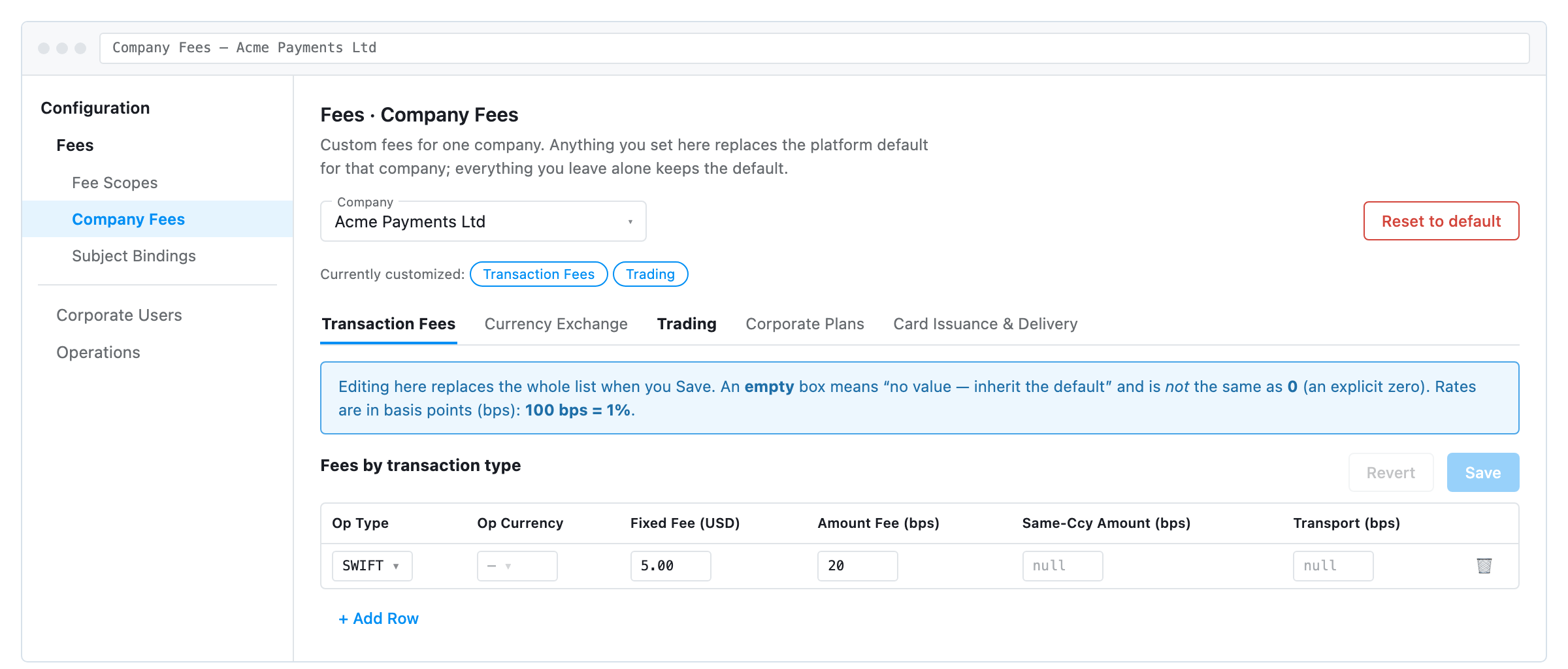
The Currently customized chips and the bold tab labels show which areas you have changed. Everything else is on the platform default.
Important: Reset to default removes every custom fee for the company in one action — all tabs, all tables. There is no undo and no partial reset. To clear one table only, empty its rows and save that block.
Bind an Individual User
A binding attaches one end-user wallet address to one fee scope. From then on that user is priced entirely by that scope.
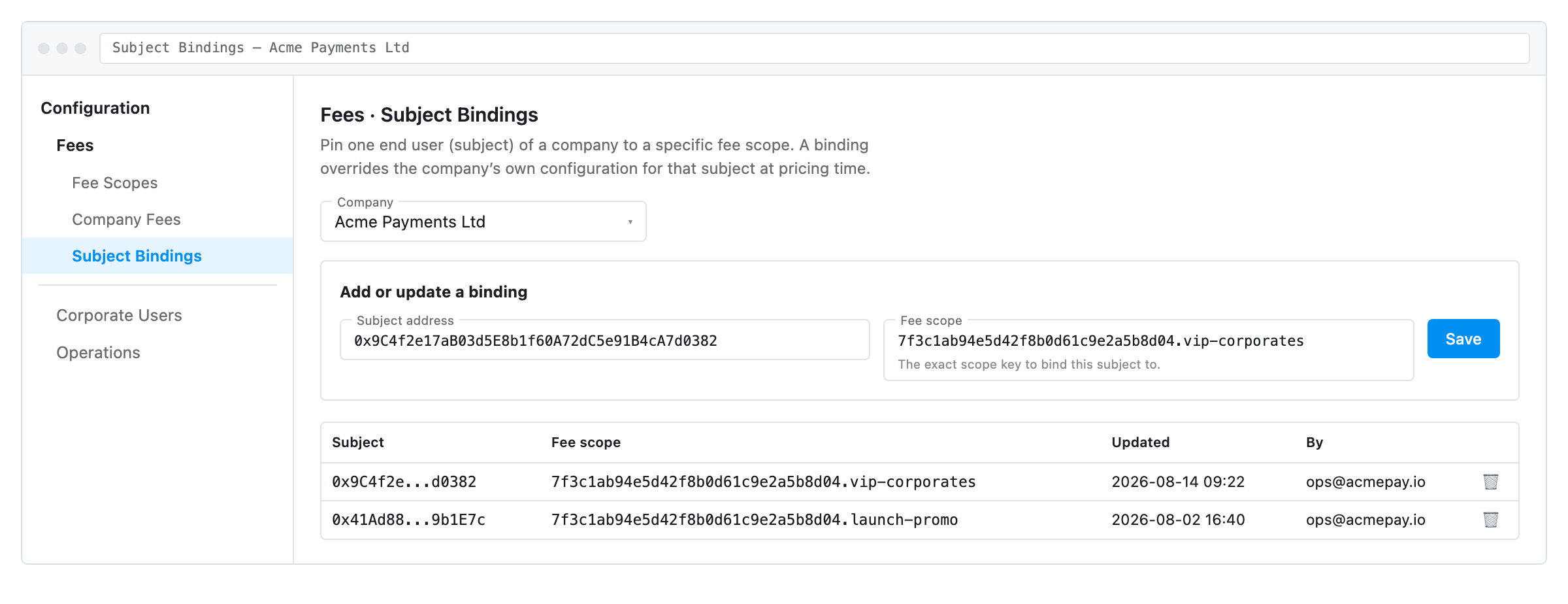
Step 1: Copy the full scope id
On Fee Scopes, select the scope. The id is the line under the picker. This is the value Step 3 requires.
Step 2: Enter the user's wallet address
Paste the full address into Subject address. A truncated display value is rejected.
Step 3: Enter the scope id and save
Paste the full scope id into Fee scope and press Save. The field checks the format before sending, then Wirex checks the scope exists. A malformed id and a non-existent one are both rejected.
Step 4: Confirm the binding
The binding appears in the table below with the operator who set it and the time. Saving the same subject again updates the existing binding rather than adding a second one.
Removing a binding returns the user to the normal order: the company's scope, then Company Fees, then the platform default. It never strands them.
Fee Fields
Fees by transaction type
| Column | Unit | Meaning |
|---|---|---|
| Op Type | list | Which operation the row prices. Fixed list, selected from the dropdown |
| Op Currency | code | Optional. Blank prices the operation in every currency. A row naming a specific currency wins over the blank-currency row for that currency |
| Fixed Fee (USD) | USD | A flat amount added per transaction. Decimal, for example 0.35 |
| Amount Fee (bps) | bps | Your percentage of the transaction amount |
| Same-Ccy Amount (bps) | bps | Replaces Amount Fee when source and destination are the same asset. Blank uses Amount Fee for those too |
| Transport (bps) | bps | Your share of the network cost. Ignored when Wirex absorbs transport for that operation |
Exchange margin by currency pair
| Column | Unit | Meaning |
|---|---|---|
| Pair Class | list | DEFAULT, MAJOR_MAJOR, MAJOR_MID, MAJOR_EM, MAJOR_PEGGED |
| Markup (bps) | bps | Added to the platform exchange margin for that pair class |
| Weekend Surcharge (bps) | bps | Added only on transactions inside the weekend window. Charges nothing on weekdays |
Trading margin by asset group
| Column | Unit | Meaning |
|---|---|---|
| Asset Class | list | MAJOR, ALT, MICRO, STABLECOIN |
| Markup (bps) | bps | Added to the platform trading margin for that asset class |
Operation types
| Group | Values |
|---|---|
| Card | CARD_DOMESTIC, CARD_REGIONAL, CARD_INTL, CARD_TOPUP |
| ATM | ATM_DOMESTIC, ATM_REGIONAL, ATM_INTL |
| Bank rails | ACH, FPS, PIX, SEPA, SPEI, SWIFT, P2C |
| Trading | TRADE_CRYPTO, TRADE_FX, TRADE_STOCK |
| On-chain | TRANSFER_CRYPTO, DEPOSIT_CRYPTO |
| Card lifecycle | CARD_ORDER, CARD_DELIVERY — priced from the card price lists. A row for either must leave every fee column empty |
Currency and Asset Classes
You price by class, not by currency. One row covers every pair that falls into it. The mappings below are platform structure — not editable by you, and not shown on your screens.
Currency classes
| Class | Currencies |
|---|---|
MAJOR | CHF, EUR, EURC, GBP, TGBP, USD, USDC |
MID | AUD, CAD, MXN, PLN, SEK, SGD |
EM | BRL, COP, INR, NGN, PHP, TRY |
PEGGED | AED, BGN, HKD |
USDC, EURC and TGBP are classified as currencies, not as tradeable assets. A USDC to EUR conversion is priced as an exchange on MAJOR_MAJOR. A trading markup never applies to it.
How a pair becomes a Pair Class
| src ╲ dst | MAJOR | MID | EM | PEGGED |
|---|---|---|---|---|
MAJOR | MAJOR_MAJOR | MAJOR_MID | MAJOR_EM | MAJOR_PEGGED |
MID | MAJOR_MID | DEFAULT | DEFAULT | DEFAULT |
EM | MAJOR_EM | DEFAULT | DEFAULT | DEFAULT |
PEGGED | MAJOR_PEGGED | DEFAULT | DEFAULT | DEFAULT |
Only pairs involving a MAJOR get their own class. Everything else lands on DEFAULT — including MID to EM, EM to EM, PEGGED to MID, and any currency absent from the table above. A single exchange row covering the most traffic is DEFAULT.
Asset classes
| Class | Assets |
|---|---|
MAJOR | BTC, ETH, SOL |
ALT | ADA, APT, ATOM, AVAX, BCH, BNB, DOGE, DOT, HBAR, LINK, LTC, MATIC, NEAR, SHIB, TON, TRX, UNI, XLM, XRP |
MICRO | No assets listed. Every asset absent from the rows above prices as MICRO |
STABLECOIN | No assets listed. Stablecoins are classified as currencies instead |
Important: A markup row on
STABLECOINearns nothing while no asset is classified into it. List a new asset and aMICROrow prices it, notALT.
Exchange or trading — one applies, never both
| Priority | Condition | Result |
|---|---|---|
| 1 | Both sides are listed currencies and the pair resolves to a named class | Exchange markup for that pair class |
| 2 | Either side is a listed asset — source checked first | Trading markup for that asset class |
| 3 | Either side is a listed currency | Exchange markup on DEFAULT |
| 4 | Neither side is recognised | Trading markup on MICRO |
Same-asset transactions skip both. No conversion means no margin to add to.
Common Pitfalls
| Situation | What happens |
|---|---|
| You cleared a field to make a transaction free | Empty means no addend. The platform fee still applies in full. Empty is already how you charge nothing on top; the platform fee cannot be zeroed from these screens |
| You set Transport (bps) and see no charge | Wirex absorbs transport for that operation. A transport addend only takes a share of a charge that exists |
| Your exchange markup did not apply | The transaction was same-asset. No conversion, no margin to add to. Same-asset also skips the trading markup |
You priced MAJOR_MID but earned nothing on an AUD to SEK transaction | Both are MID. Only pairs involving a MAJOR get their own class, so that transaction priced on DEFAULT |
A newly listed asset does not pick up your ALT markup | The asset is absent from the platform asset list, so it prices as MICRO. Add a MICRO row, or ask Wirex to classify the asset |
| Your weekend surcharge earned nothing all week | It is billed only inside the weekend window. Five days in seven it contributes zero |
| A bound user is cheaper than expected | The binding replaced your company fees. Anything the scope leaves undefined falls to the platform default, not to your company numbers |
| Duplicate rows appeared after an edit | Save replaces the whole table with what is on screen. Duplicates mean a row was added rather than edited |
| Changes are not visible in pricing yet | Wirex polls for configuration changes. A short delay after Save is expected. A delay beyond two minutes is a fault — raise it with your Technical Account Manager |
| You typed a lowercase operation type or currency | It is upper-cased on save. Use the dropdowns — a value outside the known list is stored and then never matched at pricing time |
Your Responsibilities
- Verify every change after saving. Reopen the screen: the Defines and Currently customized chips and the bold tab labels are read back from Wirex. An area absent from them did not save, whatever the confirmation message said.
- Build exception scopes as complete price lists. A bound user does not inherit your company fees.
- Unbind every user before deleting a scope they are bound to.
- Confirm your client class with your Account Manager before relying on Company Fees for attributed revenue.
Limitations
- Corporate Plans and Card Issuance & Delivery are visible in the editor but reject a partner's save. They set what Wirex discounts and what Wirex charges for cards.
- Currency classes, asset classes and retail plan tiers are platform structure. Changing them is a request to Wirex, not a self-service action.
- A transport addend cannot create a transport charge where Wirex absorbs the cost.
- A weekend surcharge addend bills only inside the weekend window.
- Fee scope self-service depends on the scope-ownership release being live in your environment. Until it is, Fee Scopes reports a permission warning, and Company Fees and Subject Bindings are the available screens.
Contact
| Purpose | Contact |
|---|---|
| Pricing, commercial terms, client class | Your Account Manager |
| Admin panel access and roles | Your Technical Account Manager |
| Getting started | [email protected] |
Updated 2 months ago